Pomodoro timer app
A focus timer that actually knows what you are working on.
A standalone timer app is just an isolated stopwatch that beeps at you. It tells you that 25 minutes elapsed, but has no concept of what you were trying to accomplish.
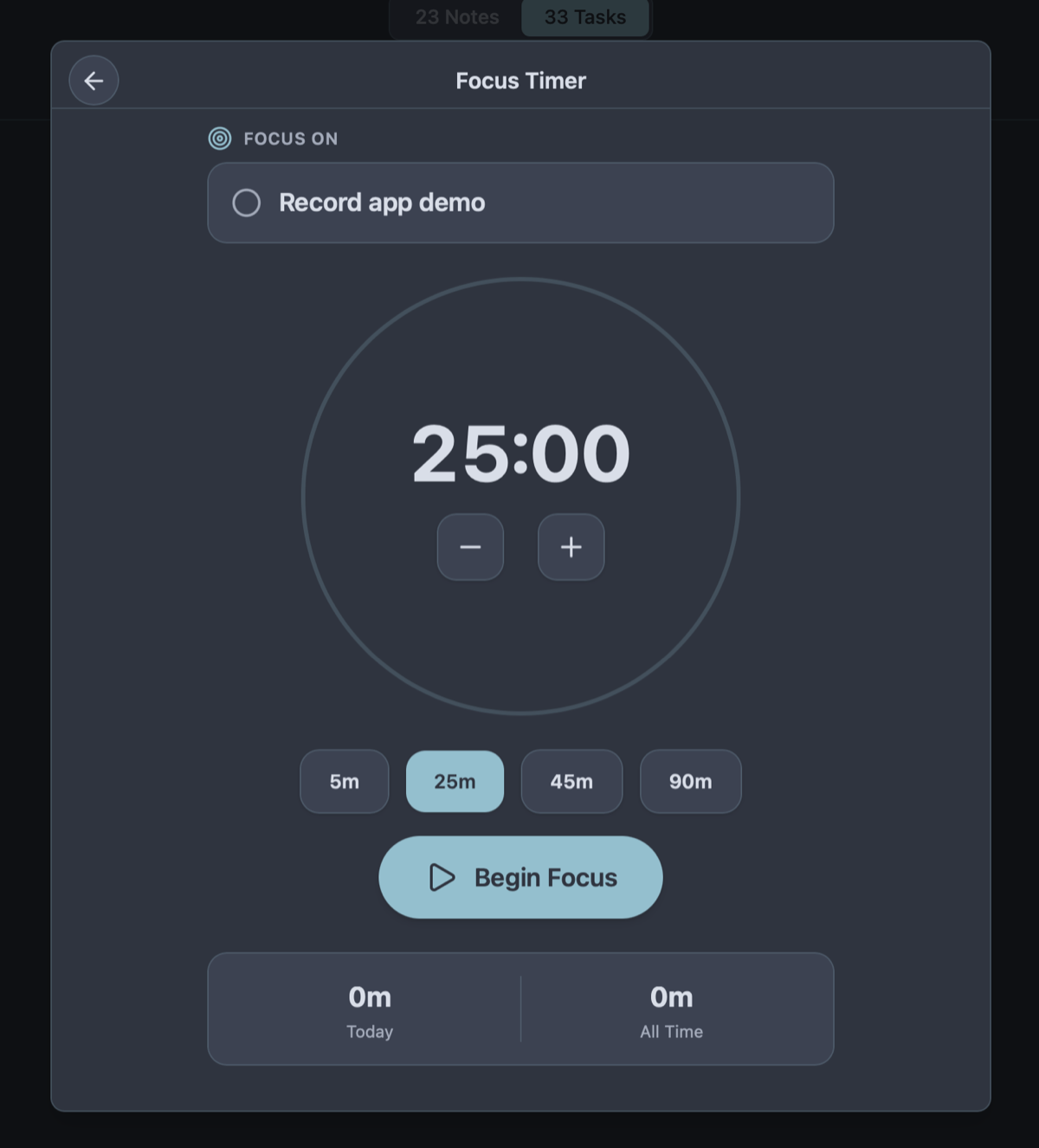
Owldo's Pomodoro timer lives directly inside your task manager, intimately bound to a specific task, note, and Space. When focus is directly anchored to the work itself, Pomodoro ceases to be a tedious ritual and becomes effortless momentum.
Our Philosophy
“Friction is the enemy of momentum.”
If you have to open a web app, wait for a loading spinner, and assign five metadata tags just to write down a single sentence, you will simply stop writing things down. We utilize a local-first SQLite architecture to guarantee zero-latency capture.

What you get
- Launch focused sprints directly from your active task checklist
- Keep technical notes and project context visible beside the timer
- Track focus streaks and completed sprint sessions automatically
- 100% offline functionality across desktop and mobile devices
- Configurable sprint intervals (25/5 or 50/10) with calm audio cues
Focus Without Opening Another Window
Attention residue is a scientifically verified tax on deep work. Research pioneered by Dr. Gloria Mark demonstrates that every context switch costs up to 23 minutes of focus recovery. Yet knowledge workers constantly interrupt themselves by switching between a task list, a notes app, and a third-party Pomodoro website.
If your timer is in another tab, opening it exposes you to browser bookmarks, unread badge alerts, and social media rabbit holes. Owldo embeds the timer directly into the task you committed to. Select the task, click Focus, and the rest of the workspace fades into calm background clarity. The feedback loop is immediate and protected.
The Psychological Power of the Finite Sprint
The core magic of the Pomodoro technique is not the arbitrary 25-minute number; it is the psychological relief of an artificial constraint. Convincing your brain to "complete a massive quarterly report" induces anxiety and avoidance. Convincing your brain to "work on section two for 25 minutes" bypasses executive resistance.
Owldo embraces this boundary. One task. One countdown. Zero multitasking allowed. Whether you are debugging complex async code, drafting a manuscript, or studying difficult material, time-boxing turns an intimidating wall of work into a series of achievable sprints.
Rhythm Over Bureaucratic Time Tracking
Most commercial time-tracking software exists to generate surveillance reports for corporate accountants. Filling out billing codes and activity categories is exhausting and demoralizing.
Owldo's focus timer exists solely for you. Its purpose is to build personal rhythm: fewer context switches, deeper flow, and a visible record of honest effort at the end of the day. We record your completed sprints and daily streaks to celebrate your momentum, never to audit your hours.
See Owldo in action
Frequently asked questions
Is the Pomodoro timer built into Owldo or a separate plugin?
It is a native, first-class feature built directly into Owldo. There are no third-party extensions, API keys, or configurations required.
Can I customize the sprint duration and break lengths?
Yes. You can customize focus sprint durations (e.g. 25, 45, or 60 minutes) and short or long break intervals to fit your personal deep work rhythm.
Does the focus timer work completely offline?
Yes. Owldo’s timer runs locally on your device without relying on internet connections, cloud webhooks, or background server pings.
Does Owldo track how many focus sessions I complete?
Yes. Owldo automatically records your daily focus sprints, streak continuity, and completed task milestones, presenting them in your daily review.
Related guides & use cases
Explore more ways to organize your thoughts and publish your work.
Guide
Focus timer features
Read more about Owldo's approach and workflows.

Task manager for ADHD
Task manager for ADHD
A calm, low-friction task manager for ADHD brains. Instant sub-10ms capture, zero streak shaming, Today/Someday horizons, and integrated focus sprints.

Daily planner
Daily planner template
A calm, no-nonsense daily planner that combines your schedule, actionable tasks, and markdown notes in one local-first view. Plan your day with zero friction.